Book Review: Product Management In Practice

This is a book worth reading if you know very little about what Product Management is, what good Product Managers look like, and how to work with them.  I can’t think of a senior engineer or manager that wouldn’t benefit from reading this book.

Some notable notes, mostly for my own record:

Here are four “core” areas in which to master as a product manager.

Communication. Strive for clarity over comfort.

Organization. Change the rules, don’t break the rules.

Research. Live in your user’s reality.

Execution. Act in way that demonstrates there is no work beneath and no work above.

Be curious about other functions across the organization, don’t strive to be an expert in them all.

Always consider goals first then practices.

Err on the side of over communication; explain the obvious.

Communicate that meetings are important and not less than important than IC work.

Learn to manage up, have the courage to challenge executives.

Connect user needs and business goals.

Build the skill to talk with users.  This isn’t obvious and requires practice and honing.; Stakeholders are different that users and require a completely different skills set in communicating with them.

Have influence on the road map; be a connective tissue to put together.

A dated consideration:

https://a16z.com/2012/06/15/good-product-managerbad-product-manager/


IGW

Creating an IGW has two impacts

1/ It creates a target for elements in a route table.  This means that egress traffic (from an instance) can be routed to the internet.  however, this take a specific step.  You have to modify a route table.

2/ In addition, and less clear, is that as soon as you associate an IGW with a VPC, all publically routable IPv4 addresses (EIP and auto-assigned IP’s) AND all ipv6 are visible on the internet.  Sure the traffic won’t be routable, but still if there are packet’s of death via the ipv6 stack, even in private subnets they are still vulnerable.  This is generally terrible!  The only defenses with AWS are security groups and NACL’s.  So: even if you are in a private subnet, you should ensure that your security groups don’t allow traffic from the internet (or only allow VPC-level traffic).

VPC Connectivity: VPN versus Peering

The Virtual Private Cloud (VPC) concept from Amazon Web Services creates an isolated boundary, defined by network rout-ability.  Said another way, computers (EC2 instances, for example) can be placed inside a VPC and, by default, network access is limited to other instances inside that VPC.  The idea is similar to most private networks (like a home network or corporate network).   The IP range chosen is usually one of the private IP ranges, see here: https://en.wikipedia.org/wiki/Private_network).

Of course, computers generally want to communicate with each other, and so the breaking of isolation begins with controlled access to other networks (such as Internet, for example).  As usual, XKCD captures this cycle : https://xkcd.com/2044/

In any event, I recently spent some time setting VPN-based connectivity between VPC’s.  Prior to any of the “VPC Peering” options, this would have been really the only mechanism possible.  I used OpenSwan for the VPC Initiator and AWS VPN for the receiver.  I’m not really sure why AWS chose to only implement the receiver side of things; it would have been nice to have had a managed initiator as well.    I got things working smoothly with no huge challenges, other than some user-inflicted typos.

I’d like to now consider the differences between peering and using VPN to connect AWS VPC’s

Internet Access.  With peering, no Internet access is necessary.  With a VPN setup, at least the initiator-side must have Internet access.  Note that the when using AWS VPN, the receiving side, doesn’t need Internet access to the VPC.

Availability. With peering, there are multiple levels of redundancy, and specifically not reliance on a single EC2 instance.  In the VPN case, for the initiator the routing rules must go to a single ENI/instance.  While there are ways to setup two instances and have a third monitoring instance update route tables when it detects a failure, this can be brittle and require minutes of convergence time.  On the managed VPN side, there are two instances (one per tunnel) which helps, though the version of OpenSwan that I used didn’t seem to support two tunnels.

Cost.  The cost of t3.small for a month is ~$14 and the cost of managed VPN is ~$36, so that is ~$50/month, plus bandwidth charges on both network egress from the imitator side and ingress on the reciever side.

ipv6.  ipv6 just works across peering (along side ipv4).  For a VPN-based solution, it may work, but doesn’t out of the box.  AWS VPN doesn’t work with ipv6 at the time of this writing.

DNS resolution.  EC2 provides a default DNS name for instances (a la ip-10-48-19-13.us-east-2.compute.internal).  This works across peering, but not VPN-based solutions.

Jumbo Frames. Jumbo frames enables the Ethernet frame to carry 9001 bytes, instead of the default 1500 for the internet.  VPN-based solutions will be limited to 1500 and also, potentially require a lot of processing to reassemble jumbo frames, which is default in the EC2 networking.  With peering, Jumbo Frames just work.

Route Propagation.  Here is a case where VPN-based solution has one advantage.  There is a feature of the Virtual Gateway (VGW) that propagates routes automatically to associated route tables.  So, if on the initiator side of things new routes are added, and advertised, the AWS route tables are automated updated.  Not so with peering.  If you add a new CIDR range to a VPC, you need to update all the route tables in the peered VPC’s to reflect the new CIDR range.  I will point out though in the VPN-case, you need to manually update any new CIDR’s ranges manually on the initiator side.

Scale and Limits.  Per the docs (https://docs.aws.amazon.com/vpc/latest/userguide/amazon-vpc-limits.html) , there can be a maximum of 10 VPN connections per VGW (and there is only one VGW per VPC).  With Peering, there is currently a maximum of 125 active peering connections per VPC, a 10x increase.  That said, to get around these limits, you can setup a “Transit VPC” configuration, which doesn’t require a mesh-configuration that Peering encourages.

Security Groups. Both currently work the same — you must manually update your security groups with the CIDR in question. Neither scenario supports security group references to the other VPC.

Security. Peering comes with a couple of distinct advantages.  One the traffic is over the Amazon backbone network, note the Internet.  This provides increased availability, bandwidth and security.  Also, because the traffic is over the Amazon backbone, the customer’s traffic (i.e. yours) is mixed in with other traffic and thus less susceptible to attacks specific to your traffic.

Serving the default page for S3 and CF

To learn more about CloudFront, I recently moved an S3-based web-site (one containing an experimental picture application) to be distributed via CloudFront.  The goal was to enable faster downloads, based on the end-user’s geography.

Setting up the CF distribution was pretty straightforward.  However, the app wasn’t working correctly: when entering the URL with just the host name, the default object (i.e. usually index.html) wasn’t loading.  It turns that this needs to be configured explicitly in the CF UI.  Here is the field in the “General” properties:

cf-default-root-object

All good: now the web-site would load when going to the base URL.  However, subsequent directories in the URL path wouldn’t load this document.

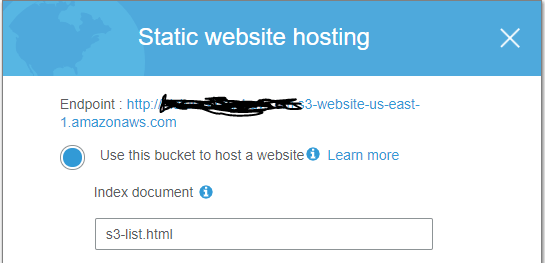
When served directly from S3, this setting:

s3-index-file

was sufficient to have the index file be used for each directory. Specifically

curl http://host.com/

curl http:/host.com/05-02-2012/

would both return the contents of s3-list.html.  However, when the DNS name for the CloudFront endpoint was used, s3-list.html was only returned for the first URL.

I researched a bit; I couldn’t determine if the S3 model is too permissive, or if the CF model was limited.  I ended up changing my app a bit to accommodate the CF model.  Namely, I changed internally created URL to reference the specific page, rather than assuming the server would return the default.


DeepLens: The Streaming Certificate

Today was my first adventure with DeepLens.  It successfully recognized my two dogs!  It also thought I was a cat, so there is that.

A wasted significant time setting up the streaming to a browser and wanted to share how I eventually got around the problem.  I seem to have missed the step during the setup phase to download the certificate needed for streaming.  Starting details can be found here: https://docs.aws.amazon.com/deeplens/latest/dg/deeplens-viewing-device-output-in-browser.html

Instead of restarting the entire setup process again, I wanted to see if I could find the certificate on the DeepLens device.  The good news is that it can be transferred via scp.  Here is the basic pattern:
-- from your laptop
ssh aws_cam@192.168.0.35
-- from the deeplens device
sudo cp /opt/awscam/awsmedia/certs/client.pfx /home/aws_cam
sudo chown aws_cam /home/aws_cam/client.pfx
exit

-- from your laptop
scp aws_cam@192.168.0.35:/home/aws_cam/client.pfx .

Internet Protocol Addresses

While doing research for a project, I had a need to understand a bit deeper how Internet Protocol (IP) addresses are routed on the world-wide Internet. The need came because I was running software that was interacting, over the Internet, with hosts that I didn’t know a priori, and weren’t using a protocol that securely mapped the remote hosts to some accredited business. An example of such a protocol is the secure hypertext transfer protocol (HTTPS) in which the remote host is validated securely to be the text name that you see in the browser address bar (e.g. https://www.wikipedia.com ).  So to who was my computer connecting and who was connecting to my computer in the absence of using such a secure protocol?

There are just north of 4 billion IP addresses in the version 4 of the Internet Protocol.  These addresses are contained within exactly one (at a given time), Autonomous System (AS) across the world.  An Autonomous System is a network managed by a given organization (business, government, education, etc) that contains within it a set of IP addresses. An AS communicates with other AS’s in the world essentially telling them “if you need to route any Internet traffic to any of these IP addresses, send them to the following servers”.  These “following servers” are servers maintained by that AS which will then route the traffic to the destination nodes with the AS.  This mechanism is the basic glue that puts the “inter” in the Internet; that is, it glues a set of independently managed and operated networks across the world.

There are around 50K AS’s in the world today.  These AS’s themselves are contained logically within, and managed by, five Regional Internet Registries (RIR’s). A RIR is an human-based organization that organizes and manage a set of IP addresses for a given region of the world.  These five RIR’s cover the entire world.  Here is a nice visual representation, along with links to the home pages of each of the RIR’s: https://www.arin.net/knowledge/rirs.html .  Here is another view which maps a country to RIR directly: https://www.nro.net/about-the-nro/list-of-country-codes-and-rirs-ordered-by-country-code/ .   Finally, this following list appears to the list of current known AS’s: ftp://ftp.arin.net/info/asn.txt , though I’m skeptical because it only lists around 26K entries.

Wrapping this up, if you want to run your own Internet Service Provider, you need to buy a set of publicly routable IP addresses (I hear the current price is around $13 each), go to your local RIR to request a AS number, and then start publishing to other AS routers where to route your newly-purchased IP addresses.

Now, back to my problem at hand. I have a collection of IP addresses about which I’d like to know more information.  I figured the first thing that would be helpful is from what AS do they originate.   The Americas-based RIR (ARIN) has a nice website that answers some of this, including the contact information associated with AS, for example, http://whois.arin.net/rest/ip/162.244.138.1

For interested readers, click on https://www.google.com/#q=ip+address to find the IP address that your computer is currently using to communicate and then try the whois.arin.net site above to find the AS that is currently managing that IP address.  You should see the business information of whomever you purchase your Internet service.  The query is a bit more informative when using an Internet service in an unknown place (i.e. a hotel in a remote land).

Now, for IP addresses that aren’t managed by ARIN (say 91.236.24.139, which is currently not managed via an AS within ARIN), notice that ARIN simply says the RIR that is managing it.  So, I’ve found I then need to go that RIR’s website to make the query.  Finally, there is a very handy Unix-based utility whois that does the same query.  So, whois 91.236.24.139 returns the business name and AS information when available.

I’ll wrap this post up with saying that I haven’t found a consistent way to get the AS of an IP address when the RIR is not ARIN.  In particular, a number of queries in the RIPE database (the RIR for Europe, Russia, Middle East) don’t always return the AS from whois or first level web queries, though sometimes it does. I leave it for a future project to find such a reliable mechanism.  For now, using the whois and then following up with more direct RIR queries gets me the data for which I’m looking.